
ThinkDesign 2026.1 Release Notes
Many improvements have been made in version 2026.1. This document contains a list of brief descriptions of the new major features, improvements and enhancements.
New Assembly Functionalities and Improvements
ThinkDesign 2026.1 introduces a series of powerful enhancements to the Assembly functionalities.
- Improved performances on large assembly with some particular saved configurations of viewports, notably in Mating command and Save As STEP.
-
Improved usability of the duplicated components name conflict resolution dialog:
- when opening the document, if the “Rename All” option is chosen, then the dialog does not appear anymore in other workflows for example during STEP save operations and when changing Light Representations.
- the “Share” option is now only available for local components with the same bounding box.
- the "Search" option now displays in isolation alternatively the reference component and the one with the duplicated name.
It provides a visual support on the confilct before deciding to rename or share.
-
Improve in ThinkTeam the possiblity to open an archive in Full Detail mode while archived in Light Representation mode.
New Fillet Functionalities and Improvements
ThinkDesign 2026.1 introduces significant improvements to the Edge Fillet command.
In previous ThinkDesign 2025.1, collisions between fillets and the sharp edges of the solid were handled more effectively, in case of constant radius fillet.
ThinkDesign 2026.1 extends these improvements also in the case of
variable radius fillet.
Full Hybrid Modeling
ThinkDesign 2025.1 introduced the concept of Hybrid Solids.
In standard Solids, the faces of a BRep (solid with boundary representation) are parameterized Surfaces.
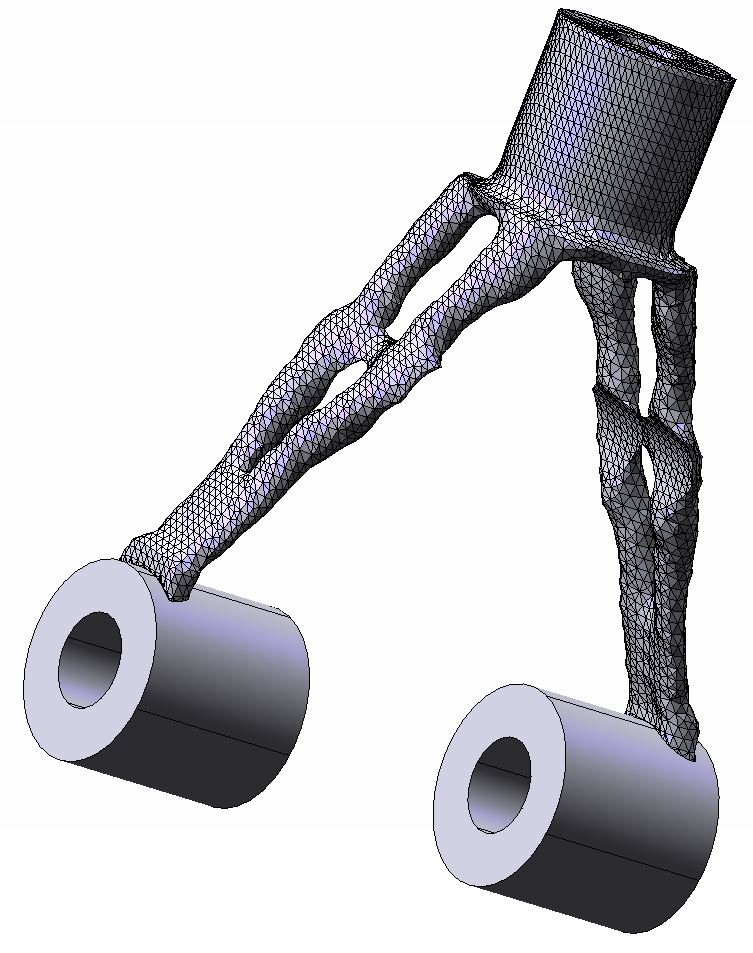
Hybrid Solids are solids where at least one face is a triangular mesh.
ThinkDesign 2025.1 was limited to support only homogeneous Hybrid Solids in which all faces are triangular meshes.
ThinkDesign 2026.1 supports Full Hybrid Solids, BRep solids in which faces can be both parameterized surfaces and triangular meshes.
| A Full Hybrid Solid |
 |
The following commands, available for standard Solids, that were extended to Hybrid Solids in 2025.1 now work transparently with Full Hybrid Solids including:
- Modeling commands:
- Make Solid, Break Solid, Invert Normals
- Transformations: Move/Copy, Mirror, Scale
- Boolean operations: Union, Intersect, Difference
- Properties and Analysis tools:
- Edit Properties
- Analysis such as Single Entity Info, Check Manifold, Check Normals, Solid Orientation, Entity Size, Mass Properties, etc.
With ThinkDesign 2026.1, support has been significantly expanded.
All the following commands now work seamlessly with Full Hybrid Solids:
-
Solid Editing:
- Cut/Split Solid
- Solid from Faces
-
Feature Creation:
- Linear Protrusion/Slot
- Rotational Protrusion/Slot
- Generic Protrusion/Slot
- Pipe Protrusion/Slot
- Holes
-
Construction and Interaction Tools:
- Work Plane on Face: The Work Plane can be set on a planar meshed face of a Hybrid Solid.
- Snap to Mesh Nodes: Enable the snap of mesh nodes within Hybrid Solids.
- Datum Plane on Face: Enable the selection of a face (mesh or surface) of Hybrid Solid for creation of datum plane.
- Plane Surface: Enable the creation of plane surface bounded by edges curves within Hybrid Solids or by mesh boundaries.
- Define Section View: Enable the selection of a planar face (mesh/surface) of Hybrid Solid as Reference Plane.
-
Interference Checks & collisions detection
-
Interference Checks command: Hybrid Solids and components containing Hybrid Solids are now fully supported.
-
Collision detection: (during Drag&Drop of one Solid inside a Mating Kinematic Chain) Hybrid Solids and components
containing Hybrid Solids are considered (as other Solids /Components in the document outside the Matings).
2D Graphics
ThinkDesign 2026.1 reintroduces the support of multi viewports for Drawing documents, with the right performances of the new 2D Graphics.
The Preferred Adapter for Drawing can be defined through ThinkDesign Settings Wizard at the first ThinkDesign startup, and then can be reset from the new
Options Graphics Adapter page.
This could be useful to choose a different Preferred Adapter only if the Current Adapter is malfunctioning or being an old graphics card.
Data Exchange Functionalities and Improvements
The supported file formats have been updated.
ThinkDesign is now capable to READ:
- Any CATIA® V5 version up to V5-6R2025
- Any SolidWorks© version up to 2026
- Any Parasolid® version up to 38
- Any Siemens NX™ (Unigraphics) version up to NX 2512
- Any JT version up to 10.9
- Any Creo - Pro/E version up to 12.4.0.0
- Any Autodesk® Inventor® version up to 2026
- Any ACIS® version up to 2025
- Any Solid Edge® version up to 2025
ThinkDesign is now capable to WRITE:
- STEP AP 242 version Edition 1, 2 and 3
- Parasolid® version 14.0
- ACIS® version 5.0
- JT version 10.0
General Software Improvement and Better Reliability
The source code has been revised to significantly improve the program's robustness and reliability.
Copyright © 2026 DPTLab S.r.l. All rights reserved
