Version 2009.3 introduces the following enhancements in the Sheet Metal functionality.
On failure of the Sheet Metal Wizard command, a warning message gets displayed. In this version, the More Details button has been introduced in this warning message. On selecting this button, the warning message expands and displays the sheet metal wizard component number that is causing the failure. Also, in some situations it displays the reason of failure of the Sheet Metal Wizard command.
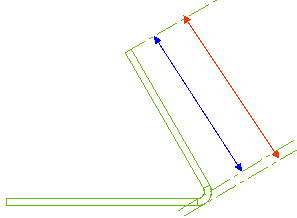
The Outer tangent and Inner tangent are two new options introduced in the Length drop-down list of the Flange selection list. They enable you to maintain the length of the flange from the tangent point of the inner and the outer radius, respectively. As shown in the image below, the blue and red lines represent the inner tangent length and the outer tangent length of the flange, respectively.